

Video games help me shake off stress and have fun, but PC gaming prices feel wild. Some people drop around $500 just to bump up their setup. I like that one of the cheapest upgrades you can make is a solid mouse pad. The best mouse pad for gaming (it depends on your preferences) carves out clean space on your desk and gives your rodent a slick, low-drag surface so you can move fast and stay sharp.
My friends and I love fast-paced games. They light up my brain in the best way. So let me share the mouse pads I and other gamers trust for our sessions.
Related: 6 Best tablets for gaming because your phone just can’t cut it
Best cloth gaming mouse pad: SteelSeries QcK
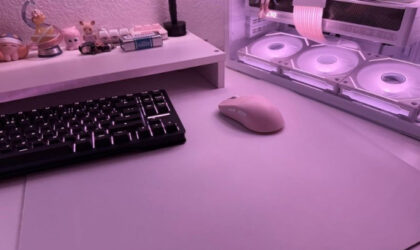
I got the SteelSeries QcK cloth mouse pad as a Christmas gift for myself, and it handles my 8–10 hours of work and game time with no fuss. It feels sturdy and keeps its shape. Other low-cost cloth pads start to fray at the edges, and that kills the clean look of a desk.
I pair my SteelSeries QcK with Logitech’s M720 Triathlon wireless mouse ($44.99, $37.99), and every movement feels precise. However, no matter what mouse you run, the high thread count and smooth top boost tracking and control. I jump into FPS games such as Call of Duty: Black Ops 7, and the glide stays smooth.
You can pick Black, White, Lavender, or Aqua. I chose the White version in a large size since I like extra room for wide swipes, but it feels bigger than I thought (450 x 400 x 2 mm). Make sure you match the size to your desk and your play style.
Best hard gaming mouse pad: Logitech G440
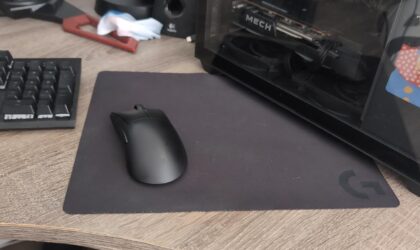
Hard mouse pads keep their firm feel and don’t compress. They offer near zero drag, though long sessions can test your wrist. Many buyers point to the Logitech G440 as a strong pick in this category.
The G440 uses a polypropylene surface that feels smooth without going out of control. It hits a sweet spot between glide and grip for both work and play. Some users say it never slows them down. The rubber base locks it in place, so you don’t need to adjust it mid match.
Best medium gaming mouse pad: Corsair MM PRO Control Esports-tuned Cloth Mouse Pad
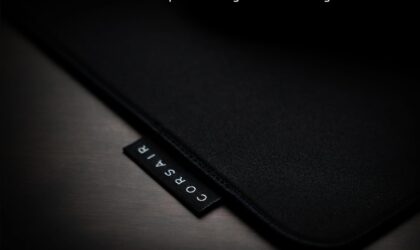
Corsair MM PRO Control Esports-tuned Cloth Mouse Pad
Medium pads strike a balance. They save desk space and slip into a bag with ease. My current pad takes up so much room that I have to fold it to fit in my backpack when I game away from home. I skip small pads for gaming since they limit wrist and arm range. A medium option like the Corsair MM PRO Control (320 x 300 x 4 mm) fits many setups and play styles.
The MM PRO Control uses a hex-pattern polyurethane base that boosts control and stopping power. Precision matters in every match. The anti-slip grip keeps the pad steady when the action heats up. From what I’ve read, Artisan pads also grip desks well, so you don’t have much to worry about.
Best large gaming mouse pad: Artisan Hien XL
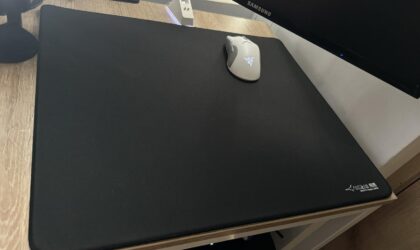
Large pads suit both low DPI and high DPI players since you never run out of space. From my own use and user feedback, many gamers lean toward widths between 450 mm and 500 mm. The Artisan Hien XL (490 x 420 x 4 mm) stands out for good reason.
Users praise the surface quality, tight stitching, and long life span. The texture adds control while still allowing speed. You feel feedback from the weave instead of drag from the pad.
Best limited edition: Drop + Nuka-Cola Desk Mat

Drop + Nuka-Cola Desk Mat
Corsair rolled out a limited gaming and creator lineup inspired by Nuka-Cola from Fallout. The Drop + Nuka-Cola Desk Mat (900 x 400 x 4 mm) looks so cool that some people hang it on the wall. But should you pick a desk mat over a mouse pad? A desk mat lets you place your keyboard on it too, which cuts key noise and keeps your gear from sliding.
In terms of build, the Drop + Nuka-Cola Desk Mat repels water and uses stitched edges for strong wear resistance. The top layer features high-density mercerized low-friction fabric that feels smooth under your hand.
Best customizable RGB lighting: Razer Goliathus Chroma
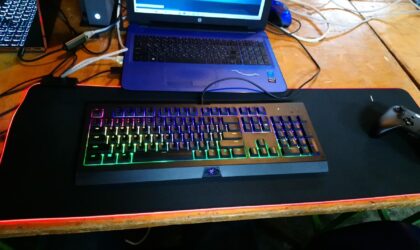
I’m not a big fan of RGB mouse pads since bright light in a dark room strains my eyes. Still, the Razer Goliathus Chroma tempts me. It stands as one of Razer’s top soft pads. You can sync it with your mouse and tweak your setup with 16.8 million color options through Razer Synapse, the brand’s free cloud tool for gear control.
Related: I love retro gaming—but $1,337 for a collector’s gaming mouse is a little too extra
Before you go
When I look at my gaming setup, I don’t chase the most expensive gear. I focus on upgrades that change how the whole desk feels. A good mouse pad does that for me. It keeps my aim sharp, my desk clean, and my sessions smooth. I game for fun and stress relief, so I pick gear that supports that goal without draining my wallet.
You don’t need to drop hundreds of dollars to level up your PC experience. Start with the surface under your mouse. Think about your space, your DPI, and how you move in game. Once you match the pad to your style, you’ll feel the difference right away.
Grigor Baklajyan is a copywriter covering technology at Gadget Flow. His contributions include product reviews, buying guides, how-to articles, and more.