

Apple has updated its support documentation to confirm the maximum battery cycle count for the new MacBook Neo. Here are the details.
First things first: what counts as a battery cycle?
In a nutshell, each battery cycle corresponds to the number of times a Mac laptop consumes the energy equivalent of 100% of its battery capacity, across one or more charges.
Or, as Apple explains it:
For example, you could use half of your laptop’s charge in one day, and then recharge it fully. If you did the same thing the next day, it would count as one charge cycle, not two. In this example, it might take several days to complete a cycle.
In other words, if you use 50% of the battery today, recharge it, then use 30% tomorrow and recharge again, and finally use 20% the next day, that would correspond to one full battery cycle, even though the Mac was recharged three times, and the battery level never dropped below 50%.
So what about the MacBook Neo?
According to Apple, the new MacBook Neo has a 36.5‑watt‑hour lithium‑ion battery, which Apple says is enough to keep it running for up to 16 hours of video streaming and up to 11 hours of wireless web browsing.
Today, Apple updated the Determine battery cycle count for Mac laptops support page to include the maximum charge count for the MacBook Neo.
Based on the document, the MacBook Neo has a maximum cycle count of 1,000, meaning that after 1,000 battery cycles, it will be “considered consumed,” after which it’ll likely need to be replaced.
Importantly, that doesn’t mean the battery will immediately stop recharging after it reaches the 1,000-cycle limit, but rather that its capacity to hold a charge and deliver power will be noticeably worse than before.
How much is that in practical terms?
That will, of course, vary widely depending on how you use your Mac. In practical terms, though, if you go through one full battery cycle per day, every single day, it would still take about 2.7 years to reach the 1,000-cycle mark.
For lighter usage, around 0.3 cycles per day, that timeline could stretch even longer to roughly nine years.
Finally, 1,000 battery cycles is on the top end of what Apple currently offers, leaving the MacBook Neo alongside most MacBook, MacBook Pro, and MacBook Air models that Apple has sold since 2009. BEfore that, battery count limits used to vary between 300 and 500.
Where can I check the battery cycle count on my Mac?
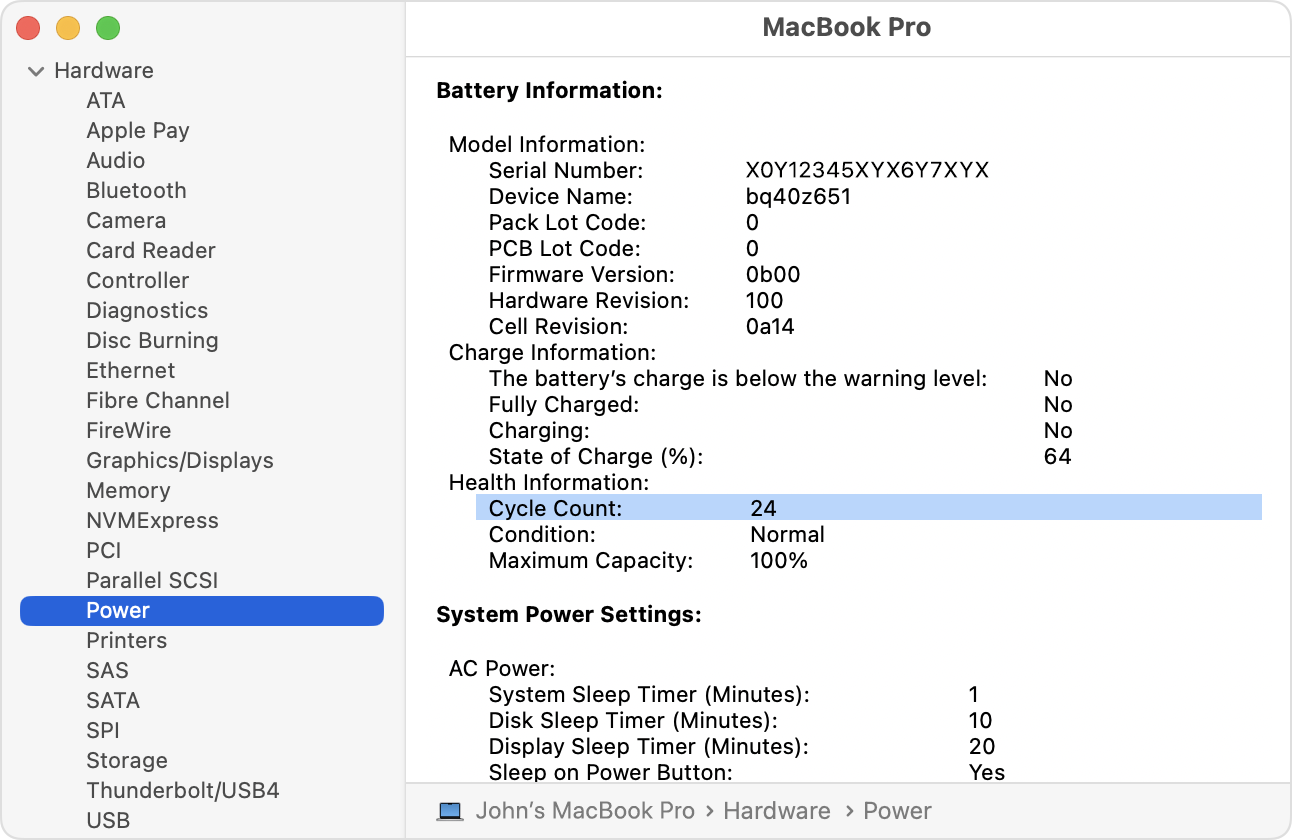
Here are Apple’s official instructions to check out your Mac’s battery cycle count:
- Hold the Option key and click the Apple menu , then choose System Information.
- Under the Hardware section of the System Information window, select Power. The current cycle count is listed under the Battery Information section.
To learn more about battery cycle counts for Mac laptops, follow this link. And the sure to check out 9to5Mac’s review of the MacBook Neo.
Worth checking out on Amazon


FTC: We use income earning auto affiliate links. More.