
Android 17 will allow gamers to remap their controllers
This eagerly-awaited gaming feature allows users to remap their game controllers at the system-level. Not only will this allow Android users to customize what happens when they press buttons, squeeze triggers, or take other kinds of actions with their controller, it allows these customizations to stay in place even when changing to another game.
Image shows Android users how to access game controller settings
A post on Reddit by Mishaal Rahman, who now handles “community engagement for Android at Google,” shows how those with Android 17 Beta 2 installed, can use this feature. First, Rahman points out that “Android supports a wide variety of gamepads out of the box” leading to the expansion of controller-ready games available from the Play Store.
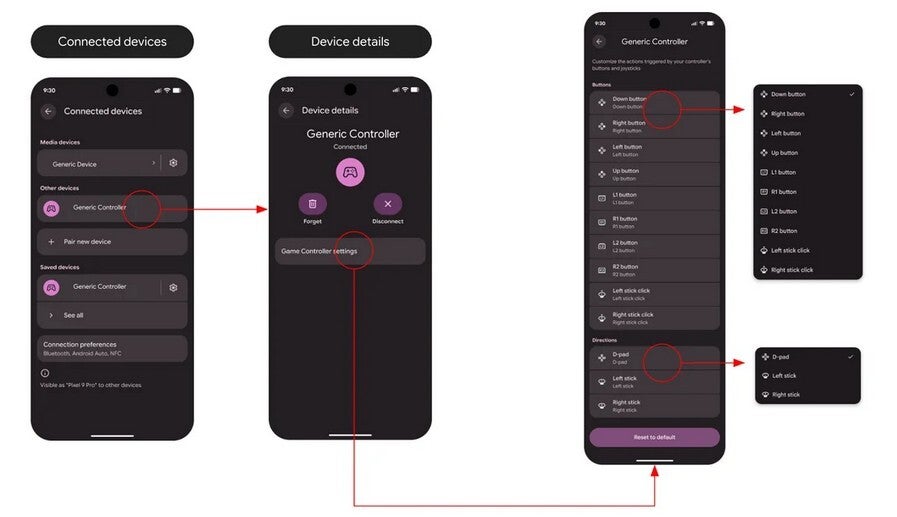
Image shows how Android users can access new game controller settings. | Image by Reddit
What to do if you have a wired or Bluetooth controller
Let’s say there is a button that is difficult for you to press. You can remap it so that an easier-to-press button will initiate the same action that the harder-to-access button previously did.
- If you have a wired gamepad, go to Settings > System > Game Controller and select your gamepad from the list of connected controllers.
- If you have a Bluetooth controller, go to Settings > Connected devices and tap the menu icon next to your connected gamepad. On the Device details page, tap Game Controller settings.
Android gamers are excited and full of anticipation
Once you arrive at the connected controller remapping page, one section lists the button inputs such as face buttons, triggers, and thumbstick clicks. Another section lists directional inputs such as left/right sticks and d-pad.
You can remap a button input to trigger another button input while the function of a directional input can be changed to function like another directional input. The comments from Android game players are ones of excitement and anticipation.