
We’re all guilty of treating our calendars as passive tools.
More often than not, you’ll enter your meetings, and that’s about it. If you’re a bit more particular, you might use it for reminders or to-dos, but that’s already more than what most people do.
Anything else to do with my daily schedule stays in my head. Effectively like an ever-evolving to-do list based on how quickly I manage to pull off tasks throughout the day.
That has a predictable outcome. While my days are busy, I’m not as productive or efficient as I can be.
Efficiency is usually eked out by optimization, and if your schedule moves around all the time, it’s not really possible to optimize.
I’d often end up in the evenings wondering where time flew. While that’s a fun statement to make, it’s not all that fun when you are constantly chasing your task list.
To that end, I decided to make changes by following a new system.
Now, before you start guessing which app or productivity system I switched to, let me be clear. It wasn’t. Instead, I started using a feature built into Google Calendar all along: Time blocking.
Seriously, all it took to take back control of my day was to start using my calendar not just to track commitments, but to actively plan my day using blocks of time.
It’s helped make my workday more streamlined and expectations more realistic. But most importantly, it’s helped me stay on top of my schedule.

4 quiet Calendar upgrades that changed how I manage my time
Google Calendar’s lesser known features can dramatically improve time management
Tasks aren’t the most efficient way to plan your day
The missing piece in most productivity systems
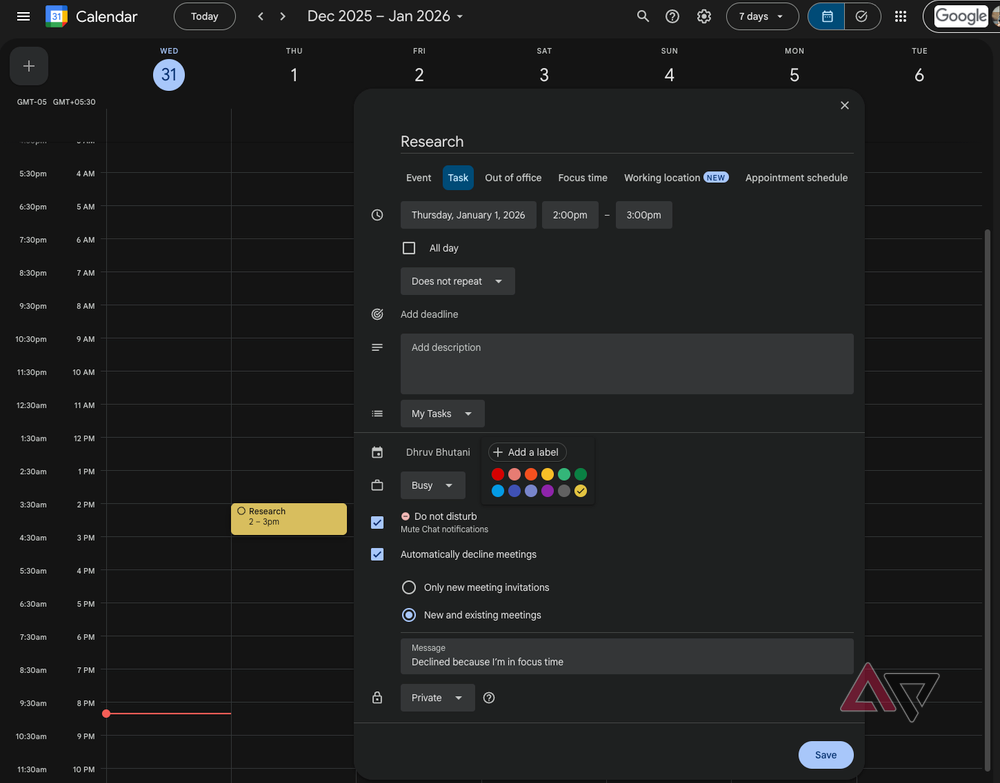
Most productivity apps start with tasks. That makes sense since most of your day is occupied with wrapping up, well, tasks.
You write things down, put them in a priority order, and press completed when complete. All that is useful, but it skips a very important point. Time.
A to-do list tells you what needs to be done. What it does not tell you is when it’ll actually happen or how to make time for it to happen.
Without time blocking, all your tasks exist in a vacuum. You can look at your list and try to get to it in time.
The problem is that your day is already jam-packed in ways that you can’t account for. Think about meetings that run longer than expected, calls, emails, admin work, and more.
That’s where time blocking steps in.
By assigning tasks to specific blocks on your calendar, you are forced to act on those tasks at a pre-decided time.
It also gives you a sense of urgency if you are procrastinating on a specific task. Moreover, it lets you see if your plans are perhaps a bit too ambitious and helps you plan better.
In my setup, I’ve started using Google Calendar to block time for everything that matters. Be it focused work, research, writing, admin work, or break times.
These blocks sit right alongside my meetings and help me organize my day significantly better. If it exists on the calendar, it needs to be done. Simple as that.
Much as I try to stick to the time blocks, if something unexpected pops up, I can move the time block around. This lets me adapt my plan but allows me to stay in control.
Time blocking works best when you keep it simple
Plan your intent instead of micromanaging tasks
Time blocking can sound complicated, but it’s really not. The key to making it work for you is to keep it simple and consistent.
You don’t need to fill up every single moment of your day. You only need to create a realistic timeline of everything you need to do in your day.
Most evenings, after I’ve wrapped up my day, I hop into Google Calendar and block out my next day. My Google Tasks list plays a big role in helping me know everything I need to do.
Since the meetings are already in the calendar, I add time blocks around them for tasks based on urgency.
For example, I’ll have a 90-minute writing time block first thing in the morning because that’s when I’m most productive. Plus, it helps me get my day’s deadlines out of the way.
In my experience, intent-based time blocks have worked out better than creating blocks for specific tasks.
This is an important distinction. While my admin tasks will change from day to day, and maybe even during the day, I usually have a rough idea of how long it will take me to wrap them up.
Google Calendar makes this entire effort frictionless. Creating an event takes mere seconds. I name it, set a duration, and move on forward.
If my work doesn’t wrap up, or my time block doesn’t work out as planned, I reschedule it. I also make use of recurring time blocks for things that I do daily.
For example, I have a fixed time block for workouts, and another one for research. These are non-negotiable, and I make sure that I don’t align with a meeting that coincides.
Time blocking helps you structure your time better
Time blocking isn’t going to give you more hours in a day. Nothing can. But it does help you make better use of the time you have.
It’s helped me reduce anxiety about micromanaging tasks for a day. Instead, I know what kind of task I’m supposed to be doing at what time of the day, and I can just get on with it.
If you find your days feeling a bit chaotic, use your Google Calendar for time blocking. You might be pleasantly surprised at how putting boundaries around your time might just help you gain more control over your schedule.